8 Thumbnail Examples That Drive Clicks: What Works in 2026
A thumbnail can look polished on your monitor and still fail where it competes, in a crowded phone feed. YouTube counts an impression only when the thumbnail is generally visible for more than one second with at least 50% of it visible, and half of all channels and videos land between 2% and 10% impressions click-through rate, according to YouTube analytics guidance summarized by ThumbnailBench. That range isn't a grade. CTR shifts with traffic source, audience familiarity, video age, and how widely YouTube pushes the video beyond subscribers.
That's why copying pretty thumbnail examples without understanding the pattern wastes effort. A loyal subscriber and a Home page stranger don't click for the same reason, and a high CTR doesn't help if viewers leave fast because the promise was wrong.
The eight patterns below break down the mechanics, the failure mode, and a tactic you can use tomorrow. Pick the one that matches your content type, test it at phone size, and judge it by qualified watch time, not taste alone.
Table of Contents
- 1. Expressive Face Close-Up with Reaction
- 2. Before and After Split Screen
- 3. Bold Text Overlay with High Contrast
- 4. Product or Hero Object on Clean Background
- 5. Curiosity Gap with Visual Annotation
- 6. Numbered List or Result Callout
- 7. Two-Shot Podcast or Interview Layout
- 8. Cinematic Story Moment with Minimal Text
- 8 Thumbnail Styles Compared
- Choosing Your Thumbnail Pattern and Testing It Like a Pro
1. Expressive Face Close-Up with Reaction
Crop tight. One face, one clear emotion, one object that explains why the face looks that way. That's the pattern MrBeast built around large expressive faces paired with bold objects, and commentary channels use the same logic when they put a shocked reaction beside a single surprising visual.
Faces work because viewers read emotion faster than they read text. Shock, delight, or disbelief gives the brain a story before the title finishes the job. The failure mode is mismatch. If your face screams disaster and the video opens calmly, you've bought a click and lost trust in the first moments.
Emotional framing itself is testable, not decorative. A one month split test for Eckhart Tolle's channel found a negative-tone variant produced a 37.1% higher click-through rate than the positive-tone original, as reported in the Vireo Video thumbnail split testing case study. Don't read that as permission to be gloomy. Read it as a reason to test benefit-led against problem-led framing while you keep everything else stable.
Build It Cleanly
- Match the title promise: The expression should confirm the emotion the title creates, not invent a stronger one.
- Shrink it first: At phone size, eyes and mouth must still read. If they don't, crop closer.
- Separate face and text: Put the face opposite any words so neither fights for the same space.
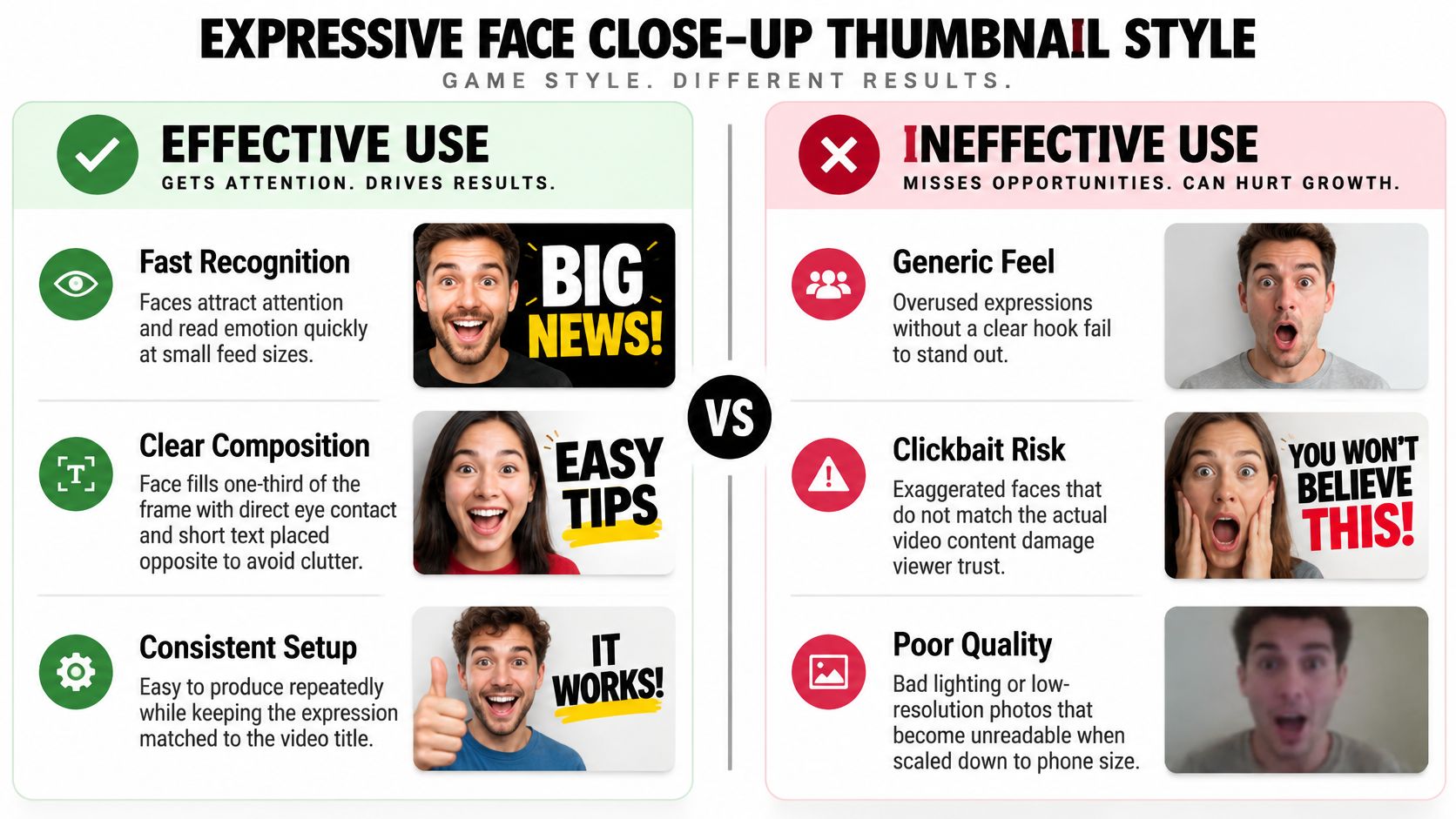
Try tomorrow: Shoot three expressions for your next video, aspirational, worried, and surprised. Pair each with the same object and title, shrink all three, and keep only the one a stranger can read instantly.
2. Before and After Split Screen
Say a home renovation channel films a kitchen rescue. The strongest thumbnail isn't the finished kitchen alone. It's the same corner before and after, split down the middle, so the transformation is obvious without a single explanatory sentence.
Design and tutorial channels run the identical play with a rough draft beside a polished result. The pattern works because it promises a visible outcome and a process worth watching. Viewers don't just see where you ended. They see distance traveled, and they click to learn how you crossed it.
The pattern breaks when the two sides don't match. Different angles, different lighting, or different framing force viewers to work out what changed, and at phone size they won't bother. A second failure is honesty. If the after image is filtered, staged, or from a different project, retention will expose it.
Watch how split compositions guide the eye in practice before you build your own version.
What Makes the Split Read
- Use identical framing: Same position and angle on both sides makes the change undeniable.
- Label sparingly: Short, high contrast labels help, but the images should tell the story alone.
- Let the after win: Make the result side brighter or cleaner, since it's the payoff viewers register last.
Try tomorrow: Before you start your next transformation video, photograph the starting state from the exact spot where you'll photograph the finish. Lock that framing now, not in editing.
3. Bold Text Overlay with High Contrast
Sometimes the words are the hook and the image is support. Business and finance explainers lean on a single large phrase, and educational channels pair one keyword with a simple graphic, because a strong claim reads faster than a scene that needs decoding.
Less text usually beats clever text. An independent test that isolated placement and typography moved CTR from 3.1% for the control to 5.6% for the strongest variant, an 81% relative increase, using one or two words in the top-left in bold sans-serif with high contrast, according to a ThumbnailCreator text placement case study. Each variant in that test received at least 10,000 impressions before evaluation, which is the discipline that makes the result usable.
Practical rule: If your phrase needs a second line of explanation on the thumbnail, the phrase isn't finished yet.
Check legibility in grayscale to confirm the contrast is real and not just colorful. Keep fonts and colors tied to your brand so repeat viewers recognize you in suggested feeds. If you'd rather hand this system to specialists, a dedicated thumbnail design service for YouTube packaging can build and test variants for you.
Try tomorrow: Take your next title, cut the thumbnail text to the single most compelling phrase, and delete every word the title already says.
4. Product or Hero Object on Clean Background
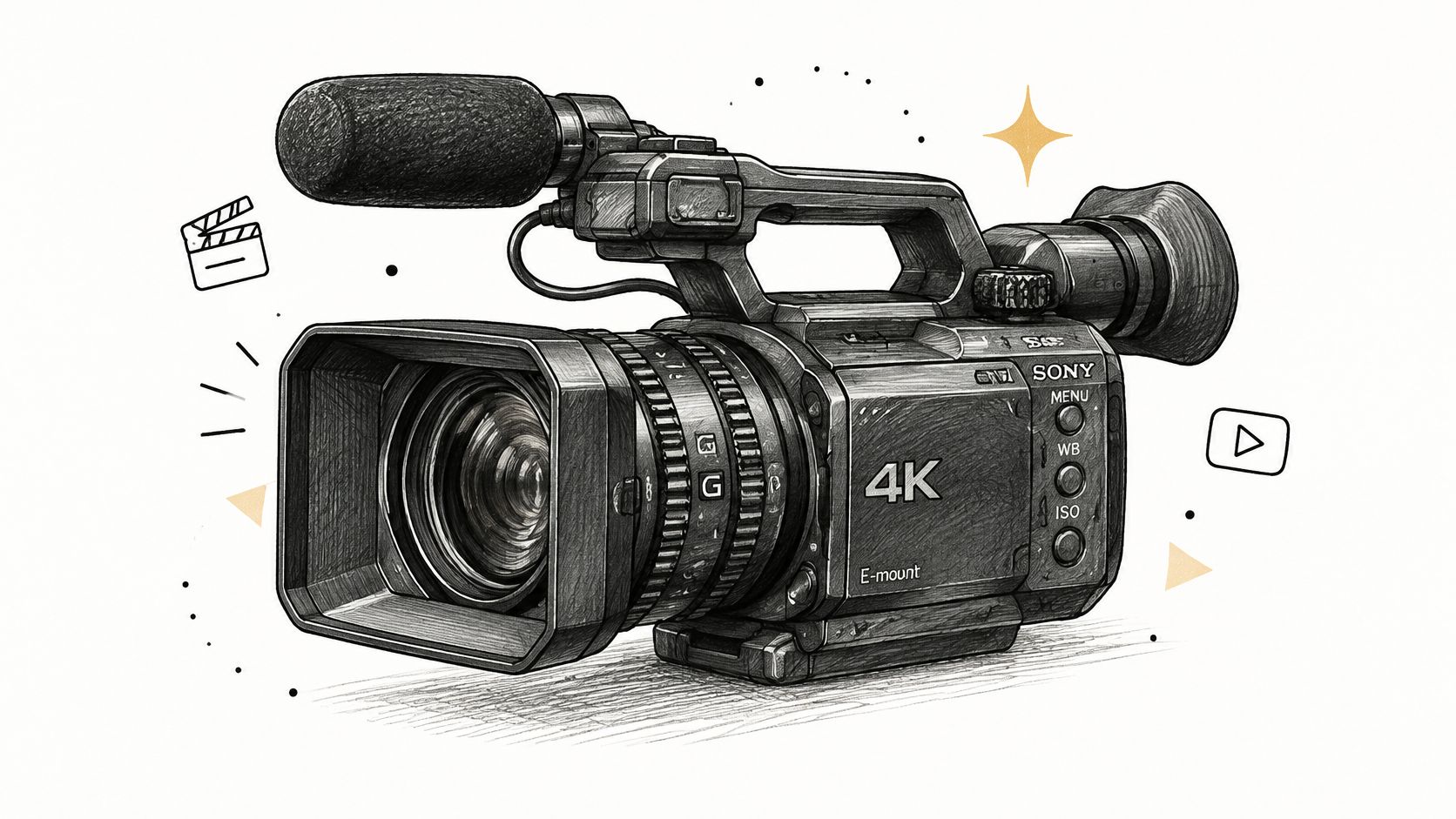
Marques Brownlee built instant recognition around one device, shot clean, against an uncluttered backdrop. Unboxing channels do the same with a single gadget on a colored background. No face, no clutter, no competing story.
This pattern signals focus and production quality. It suits reviews and comparisons because the viewer instantly knows the subject and trusts that the video will examine it properly. It fails when the product is small, dark against dark, or surrounded by props that add nothing.
Deliberate packaging at this level isn't cosmetic. A study of 3,745 videos published by 38 top brands across four industries found statistically significant relationships between thumbnail visual attributes and video view-through, as detailed in an exploration of thumbnail visual attributes and view-through. Visual choices move viewing behavior across thousands of videos, so treat the hero shot as an argument, not decoration.
Keep the Hero Shot Honest
- Use one accent color: Tie the backdrop to your channel identity so a series reads as a set.
- Add one cue only: A subtle glow or a single arrow can direct attention. Two cues become noise.
- Repeat the background: Consistency across a review series builds recognition in browse feeds.
Try tomorrow: Re-shoot your next product thumbnail with the object filling most of the frame and every prop removed. Add back one element only if the image gets clearer.
5. Curiosity Gap with Visual Annotation
A circle around something odd. An arrow pointing at a detail viewers almost missed. Science channels like Veritasium use visual questions this way, and investigation videos highlight an anomaly in the frame so the click becomes the way to resolve it.
The mechanics are simple. Show a partial reveal, withhold the explanation, and let the annotation tell viewers exactly where to look. It breaks in two predictable ways. Too many circles and nothing stands out, or the video delays the answer so long that curiosity turns into resentment.
That's why clicks alone can't judge this pattern. YouTube can test up to three title or thumbnail combinations and evaluates them through watch-time performance rather than clicks alone, as explained in YouTube's own Test and Compare guidance. A curiosity thumbnail that wins the click but loses retention is a liability, especially for founders who need qualified viewers, not raw reach. Titles and thumbnails work as one package, a point explored in this breakdown of why titles and thumbnails are half the work.

Try tomorrow: Pick the one unexplained detail your video answers earliest, annotate only that, and make sure the opening delivers the payoff before you ask for more patience.
6. Numbered List or Result Callout
Numbers give viewers a contract. A productivity channel promising a numbered framework, or a founder video calling out revenue or time to result, tells viewers exactly what they'll get and how much of it. That concreteness scans well in search and in busy suggested feeds.
Use this pattern when your content has structure or a verified outcome. Tutorials, mistake breakdowns, and result-driven business content fit naturally. A vague storytelling video forced into a numbered frame usually reads as a mismatch.
A number on a thumbnail is a claim you're asking viewers to check. If the video can't prove it on screen, don't print it.
The common failure is inflation. Creators round up, borrow someone else's result, or let the thumbnail number drift from the title and the actual content. Each mismatch costs credibility with exactly the business audience you want to keep.
Make the Number Earn Its Size
- Verify before you design: Use only counts, amounts, or time frames you can show in the video.
- Pair it with one word: A large number plus a single supporting word beats a full sentence.
- Align title and thumbnail: The same number should appear in both, worded the same way.
Try tomorrow: Audit your last uploads for any number that appears on the thumbnail but isn't demonstrated on screen. Fix the thumbnail or add the proof to your next edit.
7. Two-Shot Podcast or Interview Layout
Two faces, matched in size, at the same eye level, over a brand color your audience learns to spot. Long-form interview podcasts run consistent two-person templates across episodes, and founder podcasts pair a guest portrait with a bold topic line so subscribers can scan a back catalog fast.
This pattern answers two questions at once. Who's talking, and what's the conversation about. For a known guest, the face carries the click. For a lesser known guest, the topic or a sharp quote has to do that work instead, so don't let a famous layout hide a weak hook.
Clutter is the usual failure. Guest name, episode title, show logo, sponsor mark, and a quote can't all survive at phone size. Something has to go, and it's usually everything except the faces and one line of text.
Build a Template That Holds Up
- Match face sizes: Uneven crops make one person look like an afterthought.
- Choose name or quote: Use the guest's name or one key line, not both plus a title.
- Lock the template: A reusable layout makes the series look cohesive and speeds production.
If you publish interviews regularly, this podcast thumbnail guide for episode packaging goes deeper on templates that stay readable across a full season.
Try tomorrow: Strip your current podcast template to faces, background, and one text element. Publish the next episode with the lean version and compare it against your usual design.
8. Cinematic Story Moment with Minimal Text
Documentary and travel channels often skip the graphics entirely. One striking frame, real light, a clear subject, and little or no text. Brand films use the same restraint when mood is the promise and a bold headline would cheapen it.
This is the highest risk pattern in the list. It relies on composition and curiosity instead of an explicit claim, so it rewards channels with strong footage and an audience that already trusts their taste. In competitive browse feeds, a quiet frame can get outshouted by louder neighbors.
Device context decides whether restraint survives. Coverage of thumbnail text points to a tension where concise text may help search-driven discovery while similar treatment can perform worse in browse and suggested contexts, as discussed in Thumbo's analysis of YouTube thumbnail text. A frame that feels cinematic on a television may turn ambiguous on a phone, and color alone can't carry meaning for every viewer.
Test Restraint Instead of Assuming It
- Pick one point of interest: A single subject with clear separation from the background survives shrinking.
- Add text only with a reason: One word is justified when it sharpens mood or hook, not from habit.
- Run a louder rival: Test the cinematic frame against a bolder version and let watch time decide.
Try tomorrow: Pull five candidate frames from your next video, view them at phone size in a grid of competing thumbnails, and keep the one your eye finds without searching.
8 Thumbnail Styles Compared
| Thumbnail Style | Best For | Readability at Small Size | Main Risk |
|---|---|---|---|
| Expressive Face Close-Up with Reaction | Reaction, commentary, and emotion-led videos | High; expressions register quickly | Can feel generic or clickbait if the expression misleads |
| Before and After Split Screen | Makeovers, renovations, tutorials, and visible transformations | High; the contrast is easy to scan | Details can get lost when each half is small |
| Bold Text Overlay with High Contrast | Educational, finance, and business content | High when the phrase is short and contrast is strong | Too much text or a generic look reduces clarity and distinction |
| Product or Hero Object on Clean Background | Reviews, unboxings, and product comparisons | High; one prominent object is easy to recognize | Can look sterile without a visual accent |
| Curiosity Gap with Visual Annotation | Experiments, investigations, and mystery videos | Clear if the highlighted detail is specific and prominent | Can seem manipulative if the video does not deliver |
| Numbered List or Result Callout | Tutorials, business advice, and measurable results | High; numbers are quick to scan | Unsupported or mismatched claims damage trust |
| Two-Shot Podcast or Interview Layout | Podcasts, interviews, and guest-led conversations | Moderate; faces may shrink with more guests | Depends on guest recognition and can become crowded |
| Cinematic Story Moment with Minimal Text | Documentaries, travel, vlogs, and storytelling | Variable; depends on a clear focal point | May lack a strong hook, especially in search results |
Choosing Your Thumbnail Pattern and Testing It Like a Pro
Match the pattern to the job. Transformation content earns split screens, search-driven education earns bold text, product reviews earn the hero object, interviews earn the two-shot, and storytelling earns the cinematic still. If you're forcing a pattern onto content that doesn't contain that promise, the design will look right and perform wrong.
Three rules hold across all eight patterns. Keep one focal element per thumbnail so viewers never have to decode your layout. Verify legibility at phone size before publishing, including in grayscale, in dark mode, and with the duration badge covering a corner. And make the title add information the thumbnail doesn't repeat, so the pair reads as one clear promise.
How to Run a Test Worth Trusting
- Change one variable: Test tone, text, or framing separately so you know what moved the result.
- Document the brief: Record the control, the changed variable, the impression threshold, and the test duration.
- Judge by watch time: A winner should hold retention and attract the right viewer, not just spike clicks.
The gap between creators who grow and those who stall is rarely taste. It's systematic testing, one variable per video, judged on qualified viewing and downstream goals. For founders and podcasters, a lower CTR thumbnail that brings the right buyer or listener can be the better business choice, and an inconclusive test still tells you the variable didn't matter much.
That's exactly how strategy-led teams work. ClickTheory, the thumbnail studio inside Pixel Samy Studios, pairs every design with the right title and runs A/B tests instead of guessing, built on the principle that ten good clips outperform twenty rushed ones. Thumbnails can be started through ClickTheory at 8 for $250, and we build them specifically for YouTube search while adapting every asset to its platform, so the work compounds across your whole content engine.
Start by auditing your last ten uploads against the eight patterns above. Note which pattern each thumbnail uses, whether it is clear at phone size, and whether the opening seconds deliver what the image promised. Pick the pattern that matches your format, rebuild one underperforming thumbnail with it, and commit to testing one variable per video from here on.
If you want your thumbnails treated as packaging strategy rather than last-minute artwork, Pixel Samy Studios builds strategy-led thumbnails, titles, and A/B testing for founders, creators, and podcasters who need pipeline, not just views. Bring us your next episode or upload and we'll pair it with thumbnails designed to earn the right click and hold the viewer. Visit Pixel Samy Studios to book a demo and see how the full content engine fits together.